Demo for how to track single quantum dots on images#
import matplotlib.pyplot as plt
import numpy as np

from sl2pm import track_qd
from sl2pm.models import qd_blurred
from sl2pm.misc import fitted_params
Load four consecutive images of QDs in the brain
images = np.load('qd_images.npy')
Enter PMT parameters (known from the calibration)
ALPHA = 0.452
SIGMA = 8.5
GAIN = 3/ALPHA
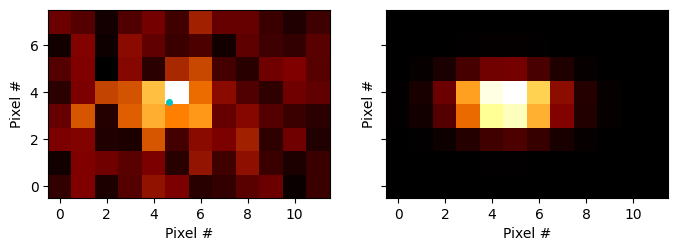
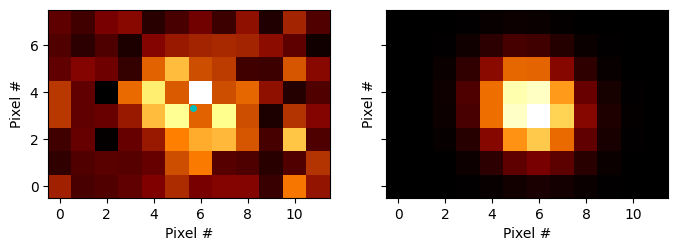
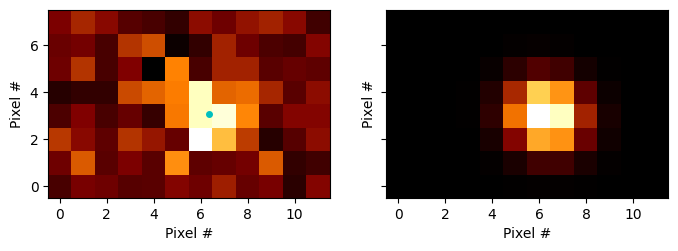
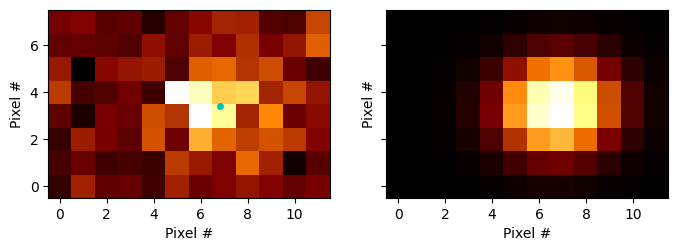
Fit images of QDs After each fit, we show raw image and its fit on the left and right panels, respectively. Cyan marker in the left panel shows the fitted center of the QD.
Tracking a single quantum dot, visualising and inspecting the fits#
X, Y = track_qd.make_xy_grid(images[0])


for i, im in enumerate(images, start=1):

    print(f'Fitting image {i}/{len(images)}...')

    optim_res = track_qd.mle_fit(im,
                                 ALPHA,
                                 SIGMA,
                                 mu=0,
                                 sigma_blur=1,
                                 delta_s=7,
                                 s_max=600,
                                 minimize_options=dict(gtol=1e-3)
                                )

    print(optim_res.message)

    pars = fitted_params(optim_res, ['b', 'A', 'xo', 'yo', 'sx', 'sy', 'theta'])

    fit = qd_blurred(X, Y, *[val for val, err in pars.values()])

    ### Plot original image and its fit
    fig, [ax_im, ax_fit] = plt.subplots(1, 2, figsize=(8, 4), sharey=True)

    ax_im.imshow(im, cmap='afmhot', vmax=im.max(), vmin=im.min(), aspect='equal', origin='lower')
    ax_im.set_ylabel('Pixel #')
    ax_im.set_xlabel('Pixel #')

    ax_im.plot(pars['xo'][0], pars['yo'][0], marker='.', markersize=8, c='c')

    ax_fit.imshow(fit, cmap='afmhot', vmax=fit.max(), vmin=fit.min(), aspect='equal', origin='lower')
    ax_fit.set_ylabel('Pixel #')
    ax_fit.set_xlabel('Pixel #')
Fitting image 1/4...
Optimization terminated successfully.
Fitting image 2/4...
Optimization terminated successfully.
Fitting image 3/4...
Optimization terminated successfully.
Fitting image 4/4...
Optimization terminated successfully.